

React API の use ってどんな機能があるの?
今回は、React 19 以降で利用できるようになった新しい React API の use について、仕組みや基本的な使い方、代表的なユースケースまでをわかりやすく解説します
use とは?
use は、Promise や Context などを描画(レンダリング)中に読み取り、 必要に応じて レンダリングを一時停止 させる React API です。
特徴
- Promise や Context をレンダリング中に読み取れる
- Promise が解決されるまで、レンダリングを一時停止する
- Suspense と組み合わせて使う
- 主に Server Components 向けに設計されている
// use(Promise or Context);
const data = use(fetchData());
const value = use(Context);
use の基本
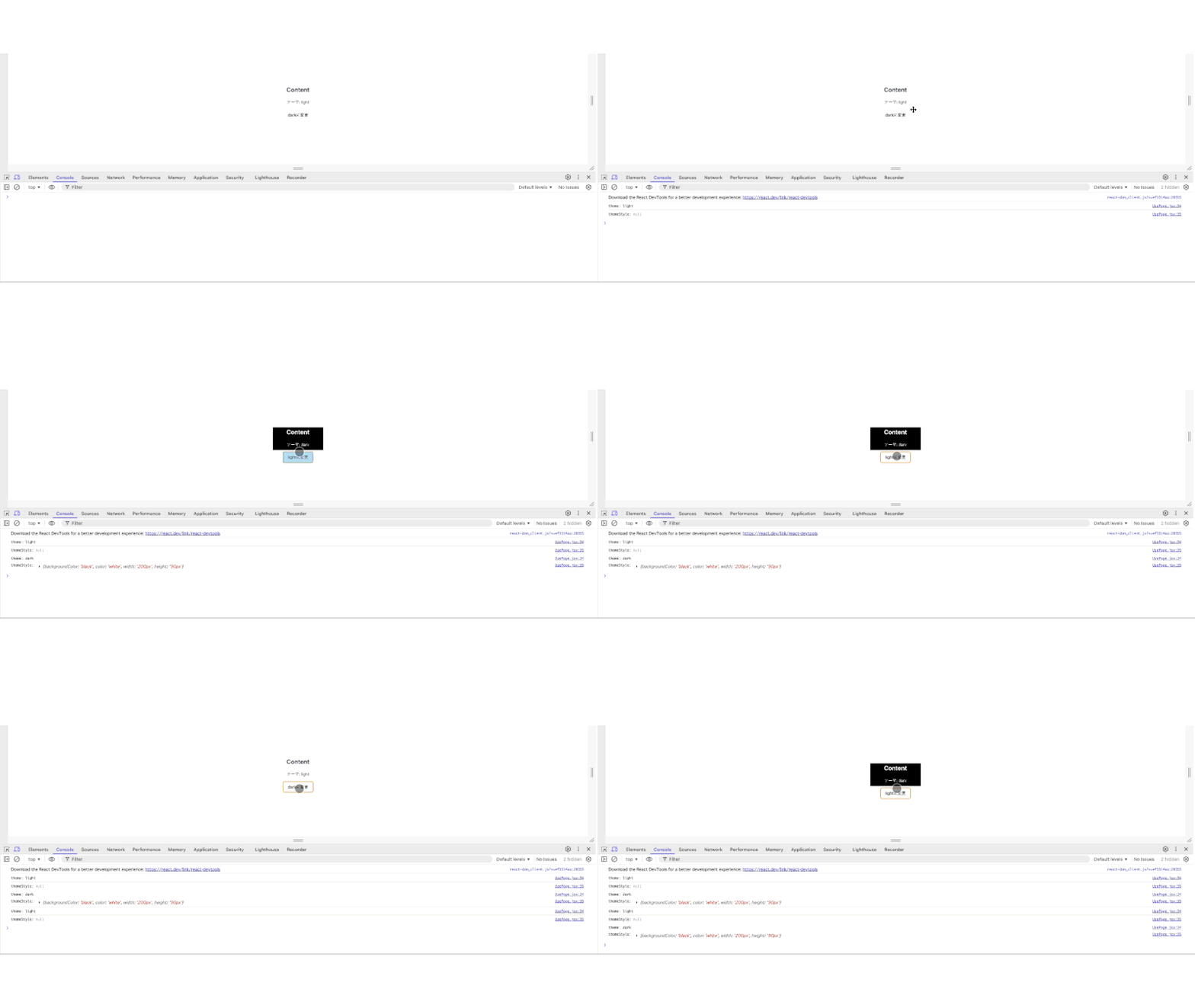
Context から値の取得 ※ useContext と同じ機能
全体の流れ
- createContext で Context を作る
- Context の value に値を設定する
- use
- use から取得した値で スタイルを変更
- use から取得した値を テーマに表示
- 取得した値(‘light’ or ‘dark’)を反転 して変更
import { createContext, use, useState } from 'react';

// ① Context を作る createContext(初期値);
const ThemeContext = createContext('light');

export default function UsePage() {
  return (
    // ② Contextのvalueに値を設定し、Contextで囲む Context value="取得したい値";
    <ThemeContext value="dark">
      <Content />
    </ThemeContext>
  );
}

function Content() {
  const [changeTheme, setChangeTheme] = useState(false);
  let theme = 'light';
  // ③ use(Context) から値を取得 取得した値 = use(Context) ;
  if (changeTheme) {
    theme = use(ThemeContext);
  }

  // ④ use(Context) から取得した値でスタイルを変更;
  const themeStyle =
    theme !== 'light'
      ? {
          backgroundColor: 'black',
          color: 'white',
          width: '200px',
          height: '90px',
        }
      : null;

  console.log('theme:', theme);
  console.log('themeStyle:', themeStyle);

  return (
    <>
      <div style={themeStyle}>
        <h2>Content</h2>
        {/* ⑤ use(Context) から取得した値を表示 */}
        <p>テーマ: {theme}</p>
        {/* ⑥ 取得した値を反転して変更 */}
        <button onClick={() => setChangeTheme((prev) => !prev)}>
          {theme === 'light' ? 'dark' : 'light'}に変更
        </button>
      </div>
    </>
  );
}
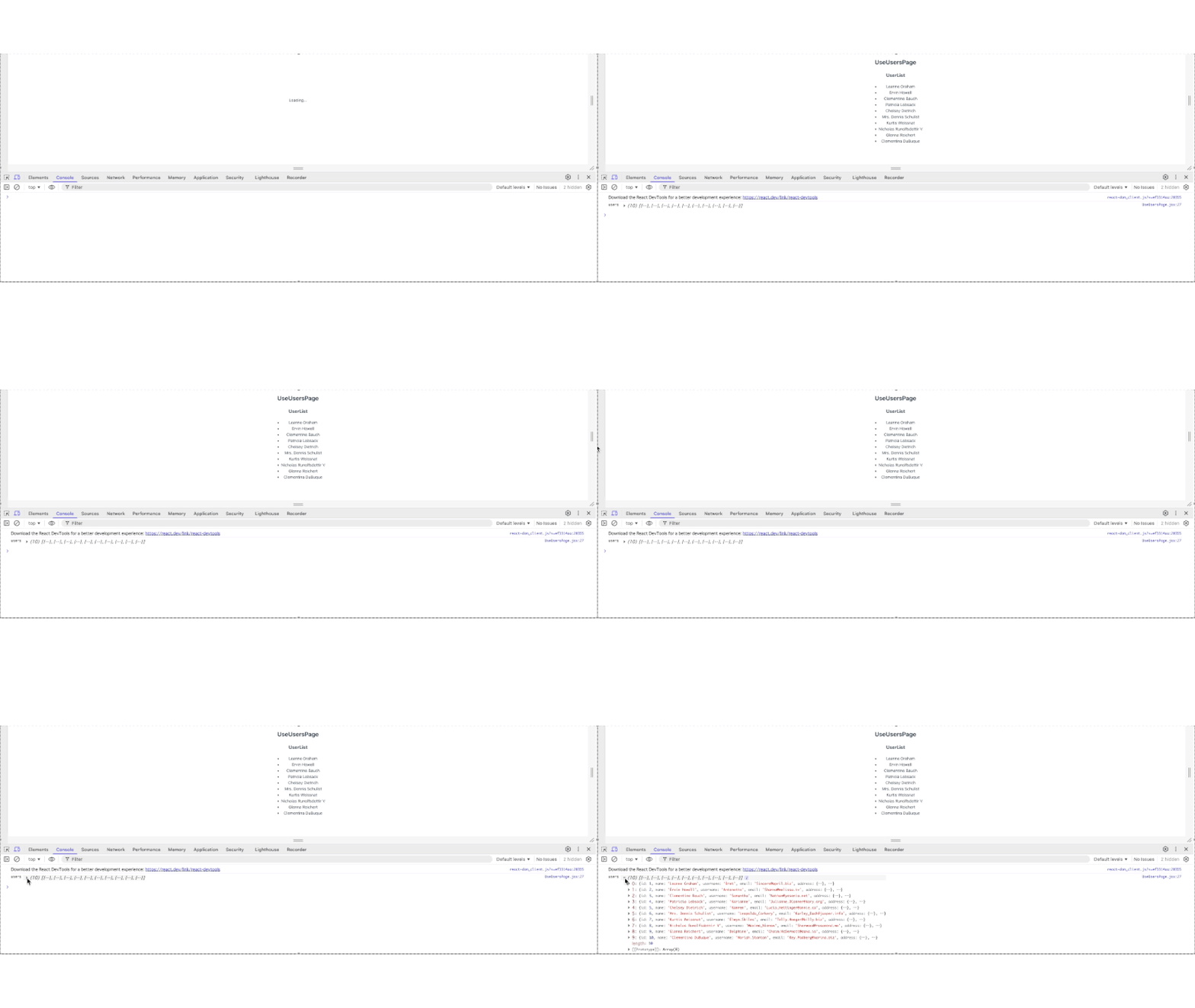
Promise から値の取得
全体の流れ
- ユーザーデータの Promiseの取得
- 取得したユーザーデータの Promiseを格納
- ユーザーデータの Promise から ユーザー情報をuseにて取得
※ ユーザー情報 を取得して表示されるまで、fallback(Loading…) を表示 - 取得した ユーザー情報をリスト化して表示
'use client';

import { use, Suspense } from 'react';

// ユーザーデータのPromiseの取得処理
async function getUsers() {
  const res = await fetch('https://jsonplaceholder.typicode.com/users');
  return res.json();
}

export default function UseUsersPage() {
  // ① ユーザーデータのPromiseの取得
  const usersPromise = getUsers();

  return (
    // ユーザーデータを取得して表示されるまで、fallback(Loading...)を表示
    <Suspense fallback={<p>Loading...</p>}>
      {/* ② 取得したユーザーデータのPromiseを格納 */}
      <UserList usersPromise={usersPromise} />
    </Suspense>
  );
}

function UserList({ usersPromise }) {
  // ③ ユーザーデータのPromiseからユーザーデータを use にて取得
  const users = use(usersPromise);
  console.log('users', users);

  return (
    <>
      <h2>UseUsersPage</h2>
      <h3>UserList</h3>
      {/* ④ use にて取得したユーザーデータをリスト化して表示 */}
      <ul>
        {users.map((user) => (
          <li key={user.id}>{user.name}</li>
        ))}
      </ul>
    </>
  );
}
useContext と use の比較・違い
useContext は Client Componentsのみ で Context の値を扱うための基本的な Hook で、use は useContext の Client Components で Context の値を扱う機能に加えて、Server Components で Promiseなどの非同期処理 を扱うことが可能です。
上記により、公式でも use を「useContext よりも優先的に使用してください」と記載があるため、useContext にこだわりがない場合は、use を使うようにしましょう。
use でコンテクストを読み取る (公式サイト)
use が登場した背景と解決したこと
従来の Hooks では Client Componentsのみ のため、Server Components では Promise を待ってから 描画(レンダリング)することができませんでした。
use の登場により、Server Components内 で Promise を直接扱えるようになり、Suspense と組み合わせた非同期でのレンダリング処理が可能 になりました。
use(React 19以降)
- Promise や Context を直接読むためのAPI
- 主に Server Components で使う ※Client Componentsでも使用可能
- Suspense とセットで動作する
const data = use(fetchData());
const value = use(Context);
useContext
- Context に保存された値を取得するための Hook
- Client Componentsのみ で使う
- props drilling(propsのバケツリレー) を回避するための仕組み
const value = useContext(Context);useContext と use の比較表
| 観点 | use | useContext |
|---|---|---|
| 主な用途 | Promise / Contextの取得 | Contextの値取得 |
| 登場時期 | React 19 | 従来から |
| 主な使用場所 | Server Components ※Client Componentsでも使用可能 | Client Components のみ |
| 非同期対応 | ✅ | ❌ |
| Suspense前提 | ✅ | ❌ |
まとめ
React API の use について、いかがでしたでしょうか?
use は、Promise や Context などを描画(レンダリング)中に読み取り、 必要に応じて レンダリングを一時停止 させる React API です。
まずは基本的な使い方をしっかり押さえ、小さな コンポーネント から試しながら、少しずつ use に慣れていきましょう。


コメント